HubSpot for Contractors: Run Sales and the Jobsite From One System
General contractors love HubSpot for one clear reason: it finally gives sales a home. Every lead, every bid, every relationship in one place, with a pipeline you can see. Then a deal closes, the crew mobilizes, and the CRM goes quiet. The work moves to the jobsite, and the office is left keying in updates that are already two days old, chasing subcontractors by text, and hunting for the latest drawing.
General contractors love HubSpot for one clear reason: it finally gives sales a home. Every lead, every bid, every relationship in one place, with a pipeline you can see. Then a deal closes, the crew mobilizes, and the CRM goes quiet. The work moves to the jobsite, and the office is left keying in updates that are already two days old, chasing subcontractors by text, and hunting for the latest drawing.
That gap between the sale and the job is where margin quietly disappears. It is also completely fixable, without abandoning the HubSpot your sales team already relies on. This guide explains why HubSpot alone cannot run a construction job, the data structure that keeps construction projects clean, how pairing HubSpot with ServiceIQ closes the gap, and what the setup delivers.
Why HubSpot alone cannot run a construction job
This is not a criticism of HubSpot. It is a matter of what the tool was built for. A CRM deal is a snapshot of a transaction. A construction job is a living series of events: inspections, submittals, installs, change orders, punch lists, and approvals, often stretched across months and multiple sites.
When you try to force all of that into HubSpot deal properties, two things go wrong. First, you get property bloat, a sprawl of custom fields that makes the CRM slower and harder to use. Second, you lose history, because a deal is built to represent one current state, not an unlimited series of recurring events. Ask a deal to track twelve inspections and it either overwrites the last one or drowns in custom properties. HubSpot is excellent at managing the relationship and the revenue. Running the physical job was never its design.
The structure that keeps construction data clean: Deal, Project, Job
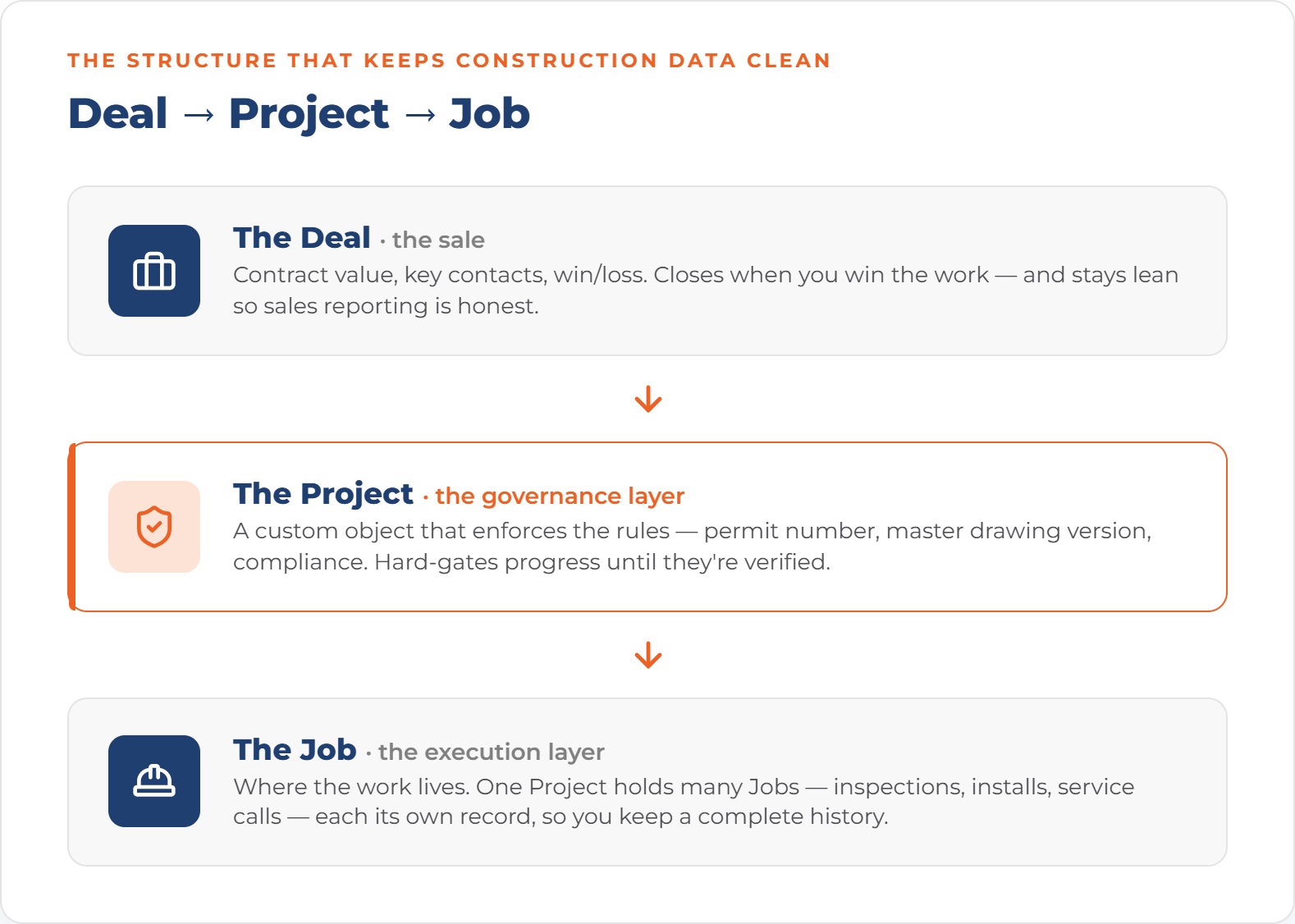
The most common and most costly mistake we see is running the entire job inside the Deal. The fix is a clean three layer structure, where each record does exactly one thing.
The Deal: the sale
The Deal holds the commercial story: contract value, key contacts, and win or loss. It closes when you win the work, and it does not follow the job into the field. Keeping the Deal lean is what keeps your sales reporting honest.
The Project: the governance layer
The Project is a custom object that enforces the rules. It holds the permit number, the master drawing version, and the compliance record. Set up well, it can hard gate progress, so a project cannot advance until the permit and drawings are verified and linked. This is the difference between a system that suggests and a system that enforces.
The Job: the execution layer
The Job is where the work lives. One Project can hold many Jobs: inspections, installs, service calls, repairs. Because each Job is its own record, you keep a complete historical ledger instead of overwriting the last entry every time something new happens on site.
When each layer does one thing, your data stays clean as you scale. The Deal does not bloat with field detail, the Project does not fill with commercial noise, and the Job does not carry governance overhead. Every record stays lean and queryable, and your dashboards finally reflect what is actually happening on the ground.
Hard-gated compliance: from suggestion to enforcement
In a standard CRM, nothing stops a rep from moving a project to in progress while the permit sits in an inbox. In a governed structure, the system logic prevents that stage change until the permit number and master drawing version are verified and linked. For construction, where a missing permit or an outdated drawing can mean rework, liability, and real money, that shift from suggestion to enforcement is the whole point.
The fix: pair HubSpot with ServiceIQ
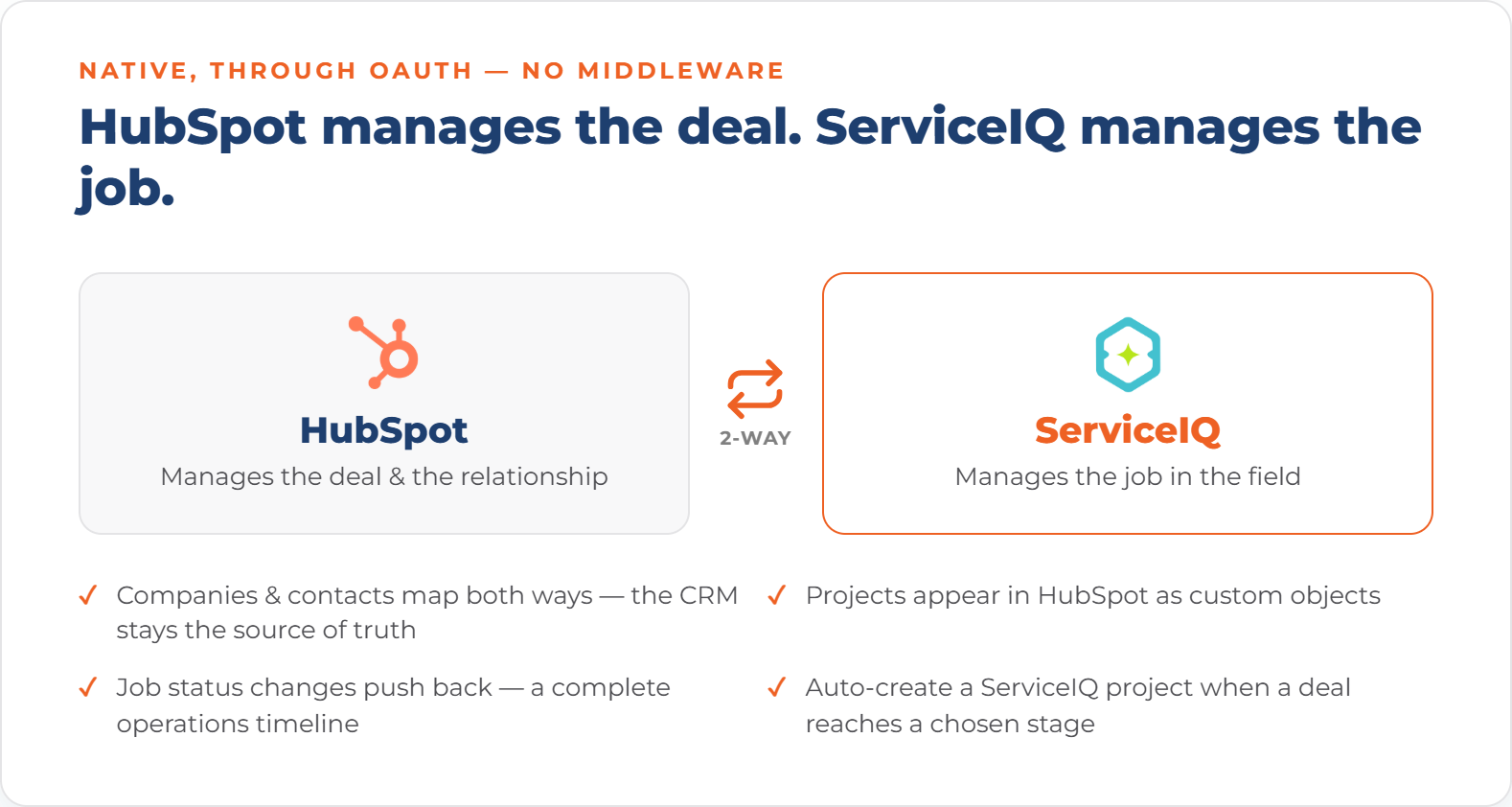
ServiceIQ is the field service platform built for general contractors, and it has a native two way HubSpot integration. The model is simple. HubSpot manages the deal. ServiceIQ manages the job. We connect the two so data flows automatically in both directions.
The connection is native, through OAuth, with no middleware and no brittle chains of third party automations. Here is what syncs:
Companies and contacts map between HubSpot and ServiceIQ, so your CRM stays the source of truth.
Projects appear in HubSpot as custom objects, giving your sales team visibility into what happens after the close.
Job status changes push back to HubSpot, creating a complete operations timeline.
You can auto create a ServiceIQ project the moment a HubSpot deal reaches a chosen stage, with zero copy and paste.
What contractors get
With HubSpot and ServiceIQ connected, you get a single system that runs sales and the field:
Job dispatch and scheduling, with a visual calendar and map based assignment.
Subcontractor management, including profiles, territories, and a dedicated contractor portal.
RFI and submittal tracking with revision history and approval workflows.
External, zero registration approvals, so owners, landlords, and architects can sign off with a click, no account required.
Time tracking and checklists so nothing gets missed on site.
Live field status inside HubSpot, so leadership sees what every crew, sub, and inspector is doing right now.
The cost of the gap, in numbers
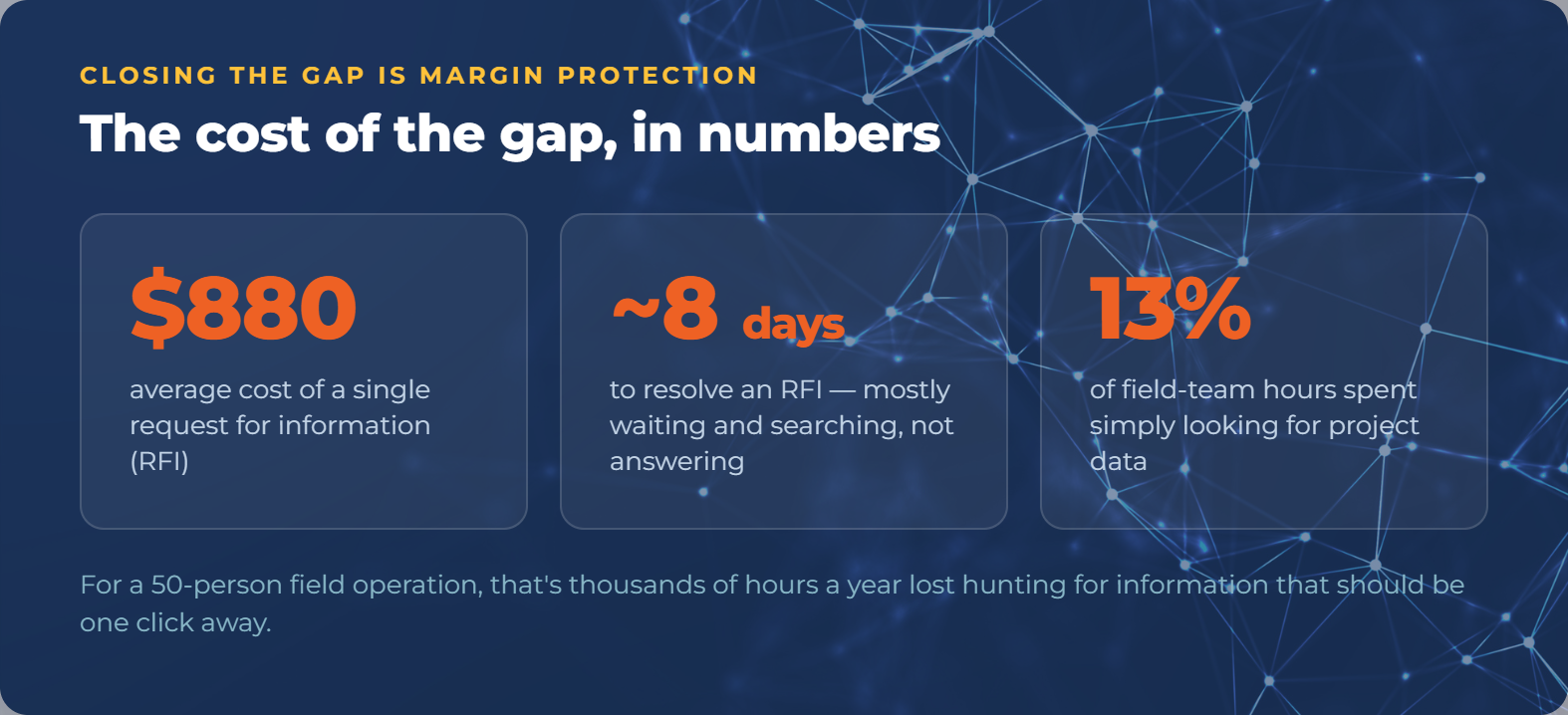
If the case for closing this gap needs hard figures, the construction data provides them. The average request for information, or RFI, costs roughly 880 dollars and takes about eight days to resolve, and most of that is waiting and searching rather than the answer itself. Separate industry research finds that field teams can spend around thirteen percent of their work hours simply looking for project data. For a fifty person field operation, that is thousands of hours a year lost to hunting for information that should be one click away.
A governed system does not just store the RFI. It shrinks the time to resolve it, because the data, the drawing, and the accountability all live in one place. Every RFI closed in hours instead of days goes straight to your bottom line.
Who this is for
This setup is the right fit when your business looks like one of these:
General contractors managing five or more subcontractors across multiple job sites.
Commercial service firms in HVAC, electrical, or plumbing with field techs who need mobile job access and time tracking.
Construction companies that need document control, submittal tracking, and approval workflows next to their sales pipeline.
ServiceIQ also serves adjacent field heavy industries, including telecommunications, renewable energy, and public works, so the same connected model applies beyond traditional general contracting.
How the implementation works: one partner for both
The practical advantage of working with us is that one partner implements HubSpot and ServiceIQ and connects them. There is no finger pointing between a CRM vendor and a field software vendor, and nothing falls through the cracks between your office and your crews.
A typical engagement sets up your HubSpot foundation, configures ServiceIQ for your field operations, builds the two way connection with the Deal, Project, and Job structure in place, and trains both your office and field teams so the system is actually adopted. You keep the CRM your sales team already knows, and you add the field layer your operations team has been missing.
A day in the life: before and after
Before, a project manager's morning goes like this. Check texts from three crews. Open a spreadsheet to see which jobs are scheduled. Call a subcontractor to confirm they are on site. Dig through email for the latest drawing. Update HubSpot by hand so the office has some idea of status. By the time the picture is assembled, it is already a few hours out of date, and half the day is gone before real work starts.
After, the same morning is one screen. Today's dispatched jobs are on the calendar. Field status is live, so the PM sees who is on site and what stage each job is at without a single phone call. The current drawing is attached to the project, version controlled. HubSpot already reflects reality because the field updates flow back automatically. The PM spends the morning managing the work instead of hunting for information about it.
What makes ServiceIQ different from generic field software
Plenty of field service tools exist. Most were built for break-fix service businesses, not for general contractors managing subcontractors, submittals, and multi-site projects, and almost none connect natively to HubSpot. That last point matters more than it sounds. Tools that bolt on through middleware create exactly the kind of brittle, out-of-sync connection that fails quietly. ServiceIQ was built for construction and general contracting, and its native HubSpot integration means your CRM and your field system share one source of truth rather than two copies that drift apart.
Implementation timeline: what to expect
Because ServiceIQ connects to HubSpot natively, the integration itself is fast. Most of the timeline goes to configuring both platforms around how you actually run projects and training your teams. A typical path sets up the HubSpot foundation and the Deal, Project, Job structure first, configures ServiceIQ for your dispatch, subcontractor, and approval workflows next, turns on the two way sync, and finishes with training for the office and the field. The quieter stretches of the year are the best time to do this, so your team learns the system before the busy season rather than during it.
Getting your crews to actually use it
Field adoption is where a lot of software rollouts stall, so it is worth planning for. The tools that stick are the ones that make a crew's day easier immediately: clocking in from the job details, seeing the schedule on a phone, capturing a signature on site without paperwork. When the system removes friction instead of adding steps, adoption takes care of itself. Part of our setup is making sure the field experience is simple enough that using it is the path of least resistance.
Beyond general contractors: adjacent industries
While general contracting is the core fit, the same connected model works for any field heavy business that runs sales in a CRM and struggles to manage the work after the sale. Telecommunications and 5G rollouts involve multi site coordination and inspections that map cleanly onto the Project and Job structure. Renewable energy installers manage crews, permits, and approvals across many sites. Public works and infrastructure teams need document control and a defensible, time stamped record of decisions. If your business sells work and then executes it across sites, crews, or subcontractors, the HubSpot plus ServiceIQ pattern applies.
The gap in dollars: a quick recap
It is worth restating the stakes in plain numbers, because they make the case on their own. An RFI averaging 880 dollars and eight days to resolve. Field teams spending around thirteen percent of their hours searching for project data. Office staff re-keying updates to keep a dashboard current that is still two days behind reality. None of these are dramatic on any single day. Across a portfolio and a year, they are the quiet difference between a job that hits margin and one that does not. Closing the gap is not a nice to have. It is margin protection.
A readiness check for contractors
You are a strong fit for this setup if several of these are true:
You already run sales in HubSpot, or you are willing to.
You manage subcontractors or crews across more than one active site.
RFIs, submittals, or approvals currently live in email and spreadsheets.
Leadership cannot easily answer where a given job stands right now.
Your office spends real time manually updating systems after the field reports in.
Frequently asked questions
Do we have to leave HubSpot?
No. The entire point is to keep HubSpot as your CRM and add the field layer it was never built to provide. ServiceIQ extends HubSpot, it does not replace it.
How long does setup take?
It varies with the complexity of your operation, but because ServiceIQ connects to HubSpot natively, the integration itself is fast. Most of the timeline is configuring the platforms to your process and training your team.
What if HubSpot cannot handle something specific to our business, like inventory?
That is common, and it is exactly the kind of gap we fill. Where HubSpot alone falls short, we build the processes and integrations, whether that is field operations through ServiceIQ or inventory through a dedicated platform, so the whole system works together.